One knowledge base for every agent your team uses
Your developers work in Claude Code or Codex. Colleagues ask ChatGPT, Claude or Mistral. Someone runs a personal agent in Hermes Agent, and your website has an assistant that answers customers. brainattic gives all of them the same knowledge base to read and write, under rules you set. What one agent saves, the others read seconds later.
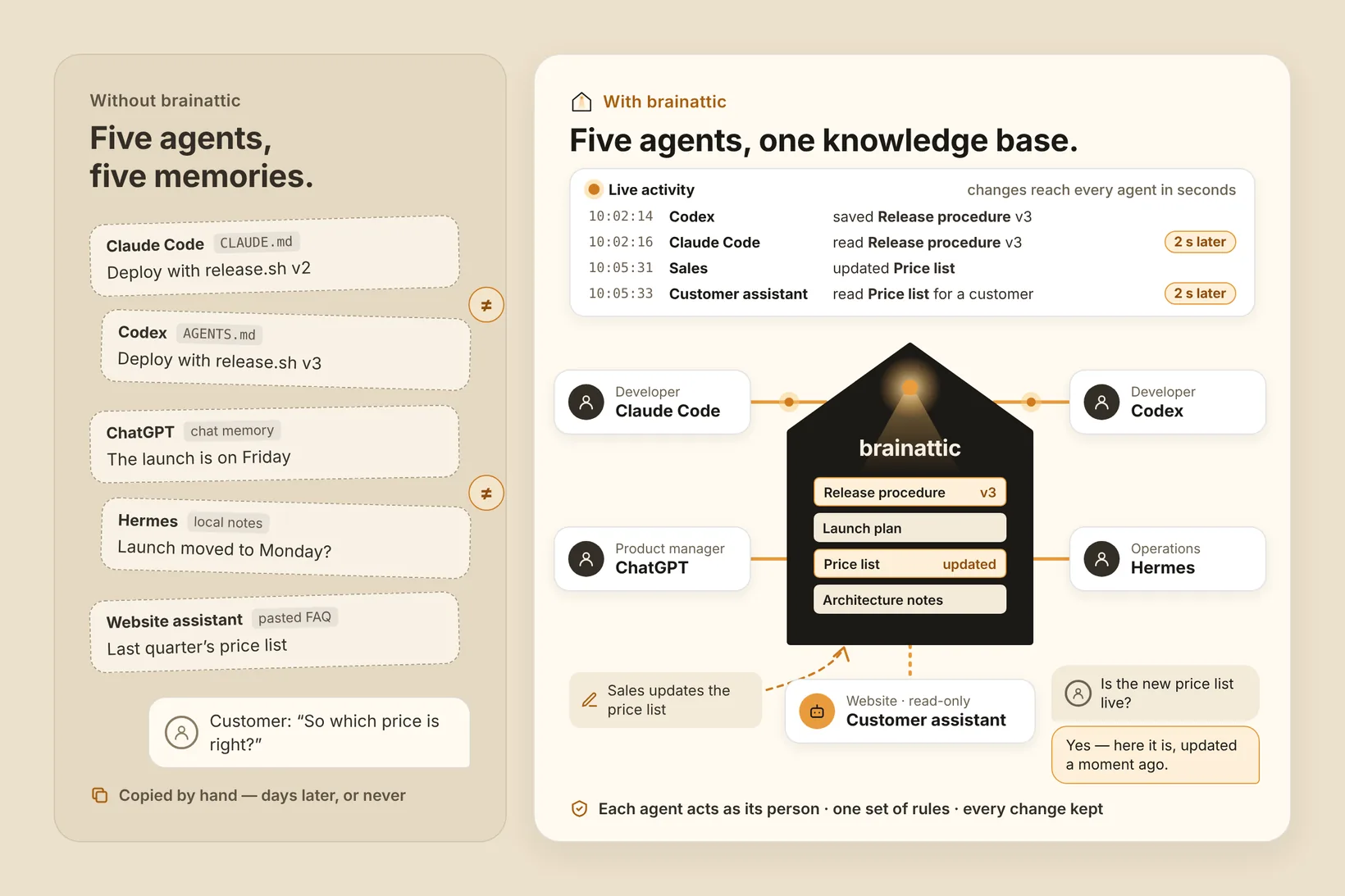
When every agent keeps its own memory
Each tool remembers things its own way: an instruction file in one repository, chat memory in another assistant, notes on someone's laptop, an FAQ pasted into the website assistant months ago. Ask two agents the same question and you can get two answers. When a process changes, someone has to update every copy by hand, and the customer-facing copy is often the last to hear.
Saved in one agent, read in the next, seconds later
Connect each agent to brainattic over MCP, the open protocol these tools use to reach outside knowledge. They all work from the same documents, so there is nothing to sync and no copy to chase. When Codex saves a new release procedure, Claude Code reads that version the next time it looks, seconds later, not after someone remembers to update its instruction file. For example:
- In Claude Code: "Before you change the deploy script, find our current release procedure and follow it."
- In ChatGPT: "What did we decide about the launch date? Show me the source."
- In Hermes Agent: "File my notes from today's supplier call with the right project, following our naming rules."
- In Codex: "Record why we chose this approach in the architecture notes."
Customers get today's answer
Your website assistant can connect with a read-only account of its own. Your team keeps prices, policies and product details current from their own agents or the editor, and the assistant reads the new version as soon as it is saved. The next customer gets today's answer, not last quarter's.
Each agent works as the person behind it
Everyone connects with their own brainattic account, so an agent can reach only what that person is allowed to read or change. Your workspace rules give every connected agent the same guidance, such as how to name things, where to file them and what a document must contain, whichever tool it runs in. Saved changes keep their history, so you can review them and restore an earlier version.
Connect your agents
Connect a compatible AI client through OAuth sign-in. There is no API key to paste. Our guides cover Claude, ChatGPT and Mistral. Claude Code, Codex and Hermes Agent each support remote MCP servers with OAuth: point them at the address in the guide for other MCP clients. See also how brainattic connects to AI clients, the MCP connection overview and the authentication guide.
Want to work out which agents your team should connect first? Talk with us.